RK3588 Thermal Design and Power Budget: How Much Heat and How to Cool
Whether RK3588 runs hot depends on the scenario: idle and light load sit in the low-watt range, while sustained CPU or NPU load raises heat flux sharply and must be handled by the cooling structure. The real test is steady-state junction temperature and clock under long heavy load, not a short benchmark run. Actual power figures must be measured.
Does RK3588 Run Hot? Break the Power Budget Down by Scenario
Before asking "does it run hot," split the load into scenarios. The same chip can differ by roughly an order of magnitude between idle, typical load, full CPU load, and continuous NPU inference. A more useful approach is scenario ranges: idle in the low-watt range; typical load (UI, light decode, network services) in the middle; full CPU load and continuous NPU inference in the high-power range, which is the real constraint for thermal design. These are magnitude references only — actual power depends on voltage, frequency, peripherals, and temperature, and must be measured and read together with the official datasheet thermal parameters.
How Do You Estimate the Power Budget by Scenario?
The table pairs scenarios, magnitude, measures, and verification so it can be used directly during mechanical design.
| Load scenario | Power magnitude | Cooling measure | Verification method |
|---|---|---|---|
| Idle / light load | Low-watt range (measure) | Smaller heat sink, enclosure conduction | Log steady-state chip temperature and idle current |
| Typical load | Mid range (UI, light decode, network) | Standard heat sink plus enclosure path | Run typical workload 30 min; watch the curve |
| Full CPU load | High-power range, concentrated heat | Larger sink area and fin height; fan if needed | Stress test: log clock drop and steady temperature |
| Continuous NPU inference | High-power range, sustained | Heat sink plus airflow or fan; avoid sealed cases | Infer 30-60 min; check for throttling |
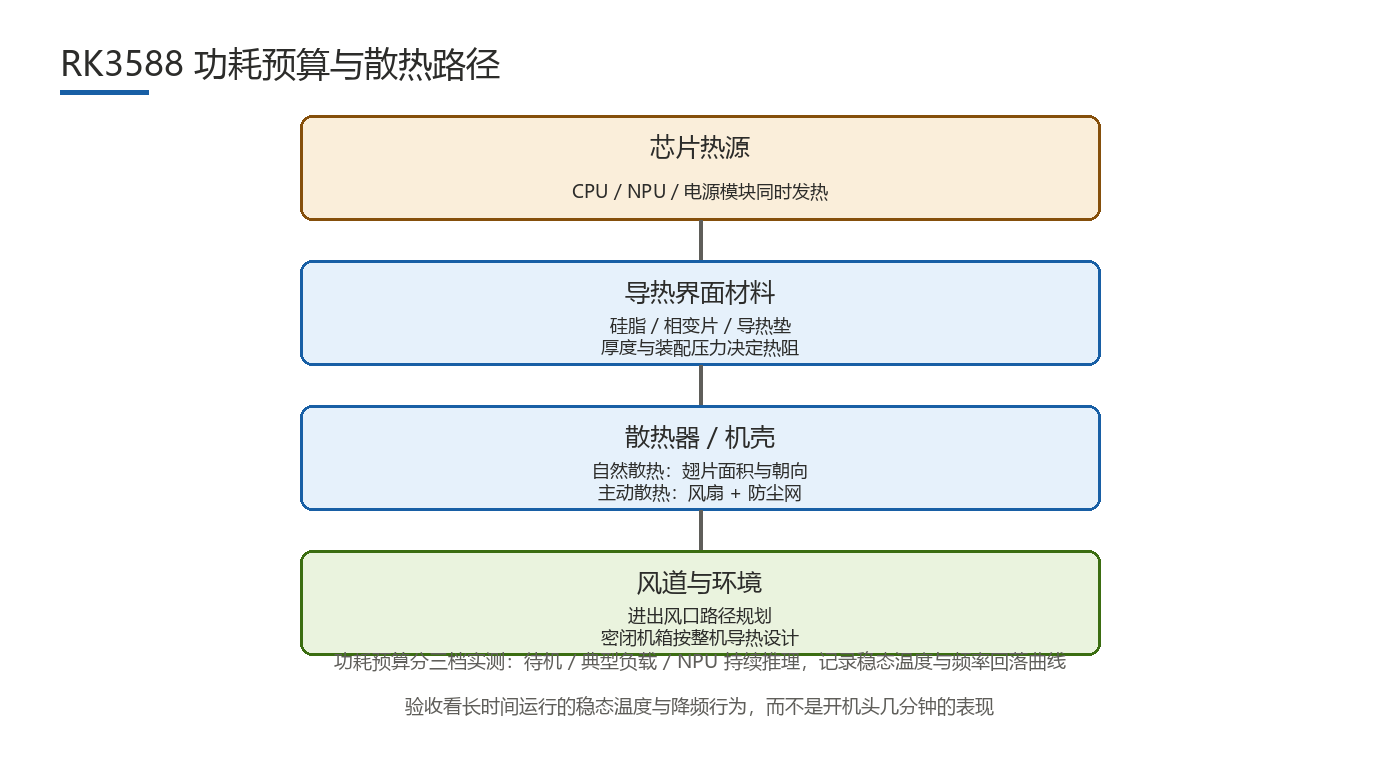
What Are the Thermal Design Paths?
- Thermal interface material (TIM): thermal grease or pad between chip and sink; thickness and mounting pressure set thermal resistance, and too thick or too loose a joint raises junction temperature noticeably.
- Heat-sink area and fin height: under natural convection, capacity tracks surface area; fins too closely spaced block airflow and reduce efficiency, while height is limited by enclosure clearance.
- Fan and enclosure conduction: forced air boosts capacity but adds fan life, noise, and dust concerns; a metal enclosure can act as a secondary heat spreader, provided the heat path from chip to case stays continuous.
- Airflow: inlet and outlet placement and internal airflow decide whether the sink actually exchanges heat; in a sealed case with no airflow, the sink reaches thermal equilibrium quickly and growing it yields little.
How Do You Manage Junction Temperature and Throttling?
The chip has a temperature wall and throttling protection: as junction temperature approaches the limit, it lowers clock to protect the device. For continuously loaded products this means peak and sustained performance are two different things — a short benchmark looks good, but after long heavy load the clock settles to a stable value, and that steady state is the product's real compute baseline. Wide-temperature products trade sustained performance for a wider range: pursuing a wider operating temperature usually means accepting throttling at higher ambient or a lower clock ceiling. Plan throttling headroom during mechanical design for the target ambient and sustained load, rather than revisiting cooling after the prototype throttles.
How Should the Measurement Method Be Defined?
Cooling results need data. Cross-check with three methods at once:
- On-die temperature sensors: read junction or hotspot temperature and watch the steady-state value under load.
- Thermal camera: map surface hotspots, focusing on the heat sink, DDR, and power modules, so local overheating is not hidden by an average reading.
- Sustained stress test: run full load for 30-60 minutes and log steady temperature and clock curves to see whether throttling occurs and where the clock settles.
When possible, re-test at the target ambient (for example the product's upper ambient limit), not just once at room temperature. Products that pass at room temperature but throttle in high ambient are a common hazard at mass production.
What Are the Common Pitfalls?
- Space conflicts: insufficient clearance between the heat sink and DDR, power modules, or CAN transceivers can surface only at assembly, when the parts no longer fit or are crushed.
- Sealed enclosures: a case with no airflow and no conduction path heats up fast inside, leaving the sink ineffective.
- Fan life and dust: fans are wear items; assess life, noise, and dust buildup for long runs, and use filters or fanless designs where possible.
- Thermal interface aging: pads and grease harden and pump out over time, raising resistance; choose for long-term stability, not initial conductivity.
- Short temperature tests only: measuring a few minutes after power-on underestimates the steady-state temperature under long load and misreads the cooling margin.
FAQ
- Q1: Roughly how much power does RK3588 draw at full load?Only scenario ranges apply: idle in the low-watt range, full CPU load and continuous NPU inference in the high-power range. Actual figures depend on voltage, frequency, peripherals, and temperature and must be measured.
- Q2: How large a heat sink is enough?There is no fixed answer; it depends on sustained load and target ambient. A practical approach is to stress-test the prototype for steady temperature and clock, then size sink area and fin height to the margin, adding a fan if needed.
- Q3: How long should the stress test run?Run 30-60 minutes and re-test at the upper ambient limit; short tests underestimate steady temperature and under-size the cooling design.
- Q4: Can passive cooling work?Yes for light or moderate sustained load, provided there is a continuous heat path to the case with margin; heavy sustained load usually needs forced air or a lower sustained clock.
Hongyin Tech provides full-stack SoM/SBC customization on Rockchip & HiSilicon platforms with Android/Linux. Engineers respond within 1 business day.
Get a Free Quote →