RK3588 Video Encoding and Streaming: RTSP, RTMP, and Low-Latency Practice
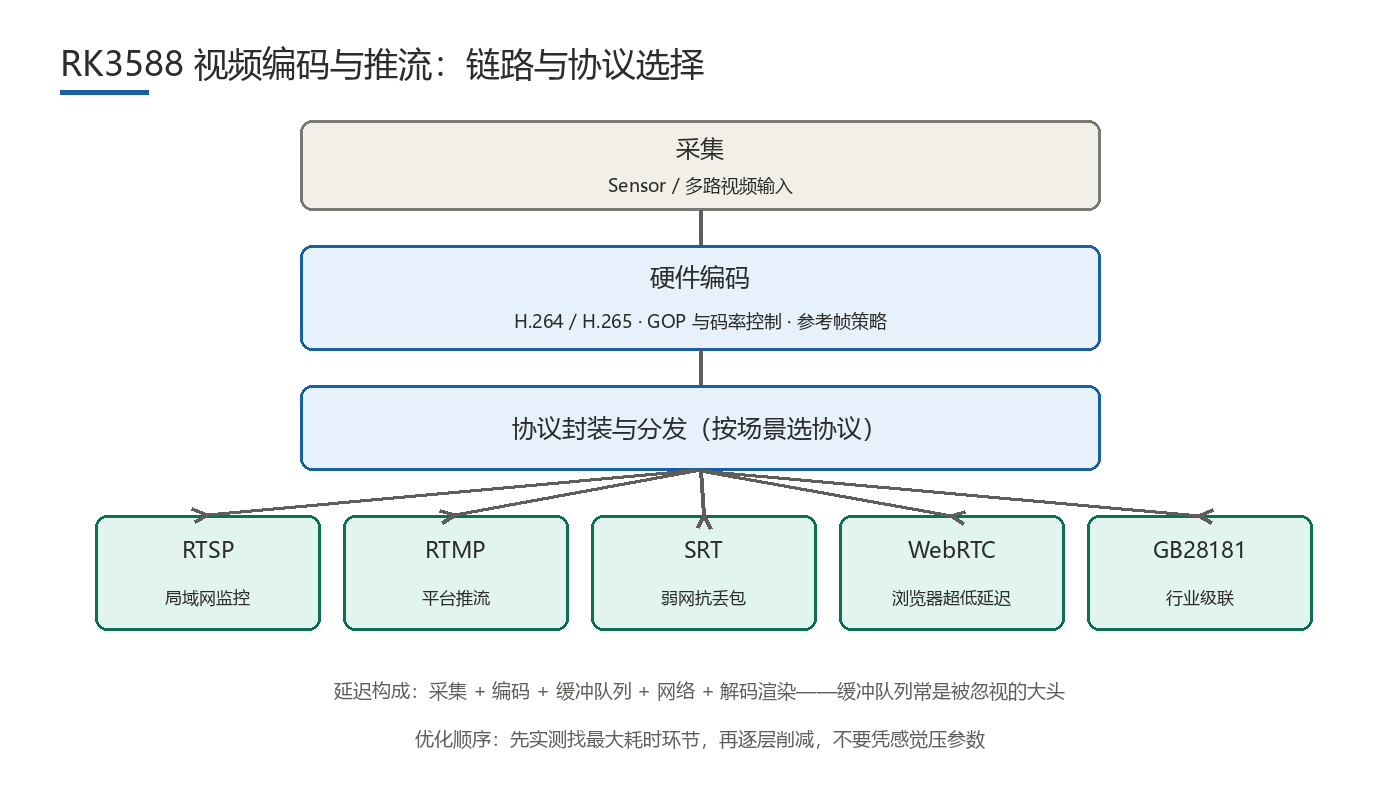
On Rockchip RK3588, hardware video encoders let the platform compress and stream multiple channels at once, but real latency and quality come from encoding parameters, protocol choice, and buffering strategy together. Low latency is not a single switch; it is trimmed layer by layer along the latency chain.
How Do Encoding Parameters Affect Latency and Quality?
Hardware encoding is a strength of this platform class; the maximum channel count and codec support depend on the official vendor datasheet. Parameter trade-offs shape bandwidth, quality, and latency directly:
- GOP length and random access: longer GOPs lower average bitrate but delay random access and fast start. Live and preview paths often hold GOP to 1-2 seconds, while recording can use longer.
- Rate control: CBR keeps output steady and simplifies bandwidth planning; VBR spends more bitrate on complex scenes for better quality but with less predictable peaks; AVBR sits between the two and fits capped-bandwidth, quality-sensitive cases.
- Reference frames and latency: more reference frames improve compression but add encode time and decode dependency; low-latency links usually reduce their count.
- B-frames: B-frames need future references, adding buffering and latency, so low-latency paths typically avoid them or use very few.
- Bitrate versus quality: when bandwidth is tight, protect frame rate and smoothness first, then lower resolution, and only then compress bitrate; over-compressing produces blocking and motion blur.
How Do You Choose Among RTSP, RTMP, SRT, WebRTC, and GB28181?
| Protocol | Typical latency | Best-fit scenarios | Main cost |
|---|---|---|---|
| RTSP | Hundreds of milliseconds | LAN preview, traditional surveillance ecosystem, NVR ingest | Weak NAT traversal; usually confined to LAN or private links |
| RTMP | Seconds | Streaming to live platforms, CDN distribution | TCP-based; latency accumulates on weak networks |
| SRT | Hundreds of milliseconds | Cross-internet, loss-resilient transport on weak networks | Both ends must support it; tooling is comparatively new |
| WebRTC | Low hundreds of ms or less | Browser-based ultra-low-latency preview, remote control | Complex deployment and signaling; higher cost for many channels |
| GB28181 | Seconds | Industry cascading, platform integration, unified management | Heavy stack; depends on platform-side coordination |
These latency ranges are empirical and depend on network quality, server forwarding, and terminal decode capability; confirm by measurement. Decide first who watches, where, and whether seconds are acceptable: prefer RTSP inside the surveillance LAN, RTMP for platform distribution, SRT or WebRTC across the public internet, and GB28181 for industry cascading.
What Makes Up End-to-End Latency?
Break the chain into capture, encode, buffer queue, network transport, server forwarding, decode, and render. The optimization order is to measure each segment, find the largest contributor, and cut it layer by layer. In practice, encode time and network transport get the attention, while the buffer queue between capture and encode is often the overlooked heavyweight: it exists to absorb jitter, and set too deep it pins latency high. Levers include reducing queue depth with a frame-drop policy, shortening GOP, cutting reference frames, choosing low-latency protocols, and merging the render and display path.
How Do You Plan Multi-Channel Concurrency and Bandwidth?
The basic bandwidth equation is total = sum of per-channel bitrates x concurrency factor, with a factor of 1.2-1.5 to cover scene changes and client reconnects. A few rules of thumb:
- Fix per-channel resolution and frame rate first, then the bitrate cap, then multiply by channel count; reversing the order risks enough total bandwidth but poor per-channel quality.
- Budget encoding capacity and network bandwidth separately, since their bottlenecks rarely coincide.
- Budget forwarding and cascading bandwidth independently of ingest.
- Keep at least 20% headroom for burst bitrate; when over budget, lower resolution or frame rate.
How Do You Localize Corrupted Frames, Stutter, and A/V Desync?
- Corrupted frames: usually packet or frame loss breaking the reference chain. Check whether key frames were lost, then network loss and decoder error logs.
- Stutter: separate the encode side from the network side. On the encode side, check whether per-frame processing exceeds the frame interval; on the network side, check jitter and retransmission. Use per-segment timing instead of overall numbers.
- A/V desync: most often inconsistent timestamp management or differing buffer depths between audio and video; check the shared time base and queue depths.
- Slow first frame: often long GOP, waiting for a key frame, or slow connection setup; shorten GOP and streamline the handshake.
FAQ
- Q1: How many video channels can RK3588 encode at once?It depends on resolution, frame rate, codec, and concurrency configuration; check the official datasheet for limits. In planning, convert to pixel throughput and keep 20% headroom.
- Q2: Which parameter should I change first for low-latency streaming?Measure the per-segment time, find the largest contributor, then usually reduce the buffer queue depth before capture and encode, and shorten GOP while cutting B-frames and reference frames.
- Q3: How much do RTSP and WebRTC differ in latency?RTSP is typically in the hundreds of milliseconds, while WebRTC can reach the low hundreds of milliseconds or less; actual values depend on network and server, so confirm by measurement.
- Q4: When bandwidth is short, what should I sacrifice first?Protect frame rate and smoothness first, then lower resolution, and only then compress bitrate, to avoid blocking and motion blur from over-compression.
Hongyin Tech provides full-stack SoM/SBC customization on Rockchip & HiSilicon platforms with Android/Linux. Engineers respond within 1 business day.
Get a Free Quote →