RK3588 Storage and Boot Media: eMMC, UFS, and NVMe Compared
Storage on RK3588 splits into two layers: the boot medium brings the system up, while the system and data media carry capacity and endurance. A common approach uses SPI NOR or eMMC for boot, eMMC, UFS, or NVMe as the system disk, and adds a data disk as needed. Choose by capacity, random I/O, TBW endurance, power-loss protection, and wide-temperature support — not sequential speed alone.
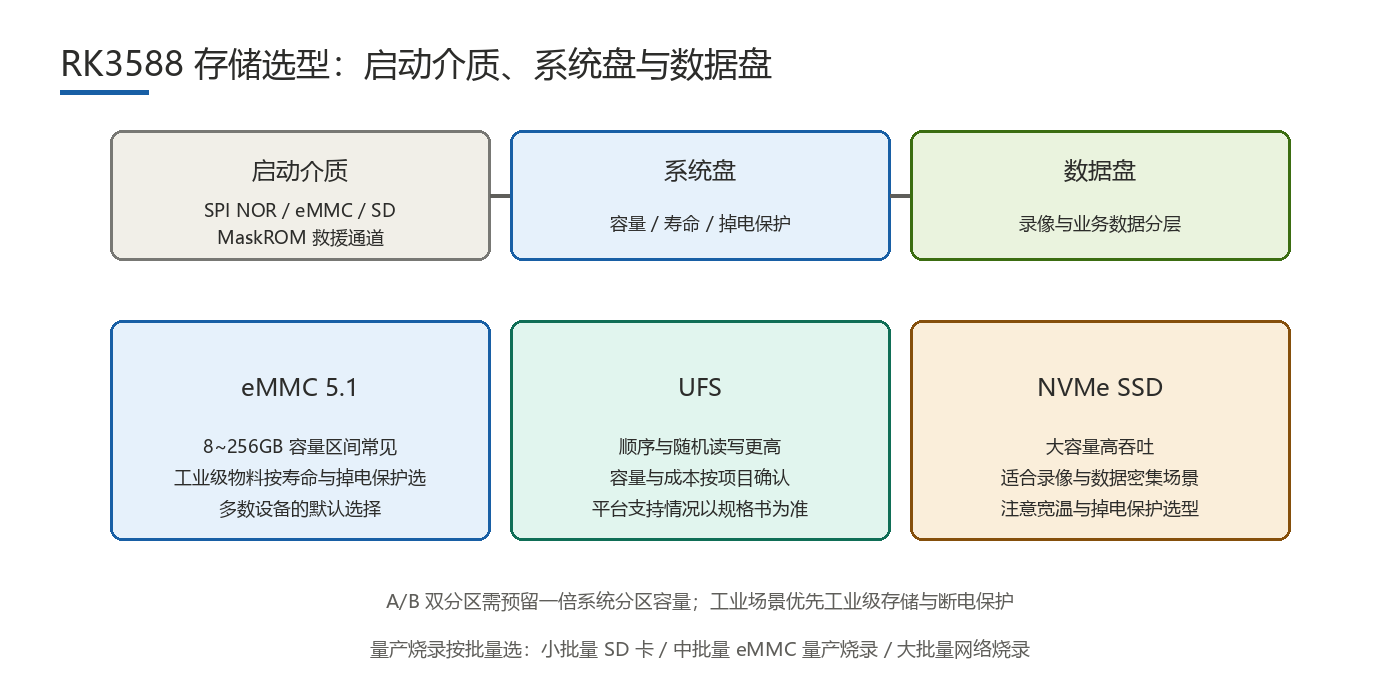
Should Boot Media and System Disk Be Considered Separately?
Yes. The boot medium decides whether the board boots reliably; the system disk decides how smoothly the system runs and how much it stores. The needs differ, and conflating them leads to a poor trade-off.
- SPI NOR boot: small and highly reliable, suited to boot code and a slim system — common where a simple boot chain and an independent system disk are wanted.
- eMMC boot: high integration and moderate cost; the mainstream boot path for embedded and security devices.
- SD card boot: easy to swap and debug; good for prototypes and low-cost products, though less reliable in contact than onboard media.
- MaskROM boot: for flashing and recovery; the standard channel for production flashing and unbricking.
Boot mode is usually selected through boot configuration (switches or resistors); the exact method follows the platform and SoM vendor documentation. Decide "what to boot from" first, then "what to use as the system disk" — do not reverse the order.
How Do You Choose the System Disk?
| Medium | Capacity range | Typical use | Main risk |
|---|---|---|---|
| eMMC | Commonly 8-128 GB | Mainstream embedded, NVR, all-in-one | Write endurance and power-loss damage |
| UFS | Higher bandwidth than eMMC | High-throughput, multi-stream writes | Cost, supply, and platform support to verify |
| NVMe SSD | Larger (hundreds of GB and up) | Large recording, high random I/O | Power-loss protection, wide temp, thermals |
| SD card | Small to mid-large | Debug, low cost, replaceable | Contact reliability and endurance |
Selection goes beyond capacity: sequential I/O affects large-file throughput, random I/O affects system response and database performance, TBW (total bytes written) sets write endurance, power-loss protection guards data on abnormal shutdown, and wide-temperature support decides outdoor or industrial viability. Specific capacity figures and platform support follow the official specs.
How Do You Define the Data-Disk Plan?
- SATA: cost-effective for large cold data (recording archives, history), well suited where random performance needs are modest.
- NVMe: high throughput and random performance for concurrent multi-stream writes and databases, but watch thermals and power-loss protection.
- External and network storage: scalable and easy to manage centrally, but dependent on network bandwidth and stability — a complement rather than the only option.
Separating the data disk from the system disk isolates write pressure: put high-frequency recording and logs on the data disk and keep the system disk relatively clean, extending its life.
How Do You Guard Against Wear and Power Loss in Industrial and Security Use?
Video recording, logs, and databases are classic continuous-write loads; long runs cause wear and write amplification, while abnormal power loss can corrupt the filesystem or the medium. Available measures include splitting logs and recording onto separate media, using a read-only root or A/B partitions on the system disk, adding power-loss protection (such as loss detection and holdup capacitors), choosing wide-temperature high-endurance parts, enabling wear leveling and health monitoring, and periodically assessing remaining life. These do not remove the risk but bring it into a manageable range; actual power-loss behavior and protection capability still follow the medium's official specs and measurement.
How Does A/B Partitioning Affect Usable Capacity?
A/B keeps two copies of the system space so an OTA failure can roll back, at the cost of lower usable capacity and higher cost. A rough formula: usable system capacity ≈ total medium capacity − two system partitions − boot and reserved space − data partition. Whether to enable A/B depends on upgrade-failure risk and field-service difficulty: remotely deployed devices with high rework cost justify it, while locally serviceable products with infrequent upgrades can weigh the trade-off.
How Do You Choose a Production Flashing Method?
- eMMC production flashing: offline programmers or fixtures; stable efficiency, suited to mid-to-high volume.
- SD-card production flashing: boot from a card with a preset image; suited to small batches, prototypes, and low-cost products.
- Network batch flashing: push images over the network; suited to mid-to-high volume and remote-update scenarios.
Consider batch size, line takt, and image-update convenience when choosing. In practice, small batches favor low-cost methods, and as volume grows, shift to offline or network batch flashing to shorten per-unit time and reduce manual intervention.
FAQ
- Q1: Must boot media and system disk be separate?Not necessarily, but separating is more flexible: SPI NOR or a small eMMC handles boot while the system disk carries system and data, easing upgrades and isolating write pressure.
- Q2: How do you choose among eMMC, UFS, and NVMe?Score each on capacity, random I/O, TBW endurance, power-loss protection, and wide temperature: eMMC fits mainstream embedded, UFS targets high throughput, NVMe targets large capacity and high random performance.
- Q3: What matters most in industrial use?Write endurance and power-loss protection. Continuous writes cause wear and amplification, and abnormal shutdown can damage data, so split media, add protection, and enable health monitoring.
- Q4: Is A/B partitioning worth it?For remotely deployed devices with high rework cost and frequent upgrades, yes; usable capacity drops, so reserve two system spaces in the capacity budget.
Hongyin Tech provides full-stack SoM/SBC customization on Rockchip & HiSilicon platforms with Android/Linux. Engineers respond within 1 business day.
Get a Free Quote →